How to Create a Website via cPanel’s Site Publisher
The Site Publisher is a useful tool, enabling you to quickly create a simple website, even if you have never created one before. This interface provides templates to choose from, and you then simply add the appropriate information to it.
Step 1. Access the Site Publisher
The Site Publisher tool is available under the Domains section.

Step 2. Choosing Website Location and the Template
- Once you click the tool, you have to choose which domain or subdomain the publisher should use.
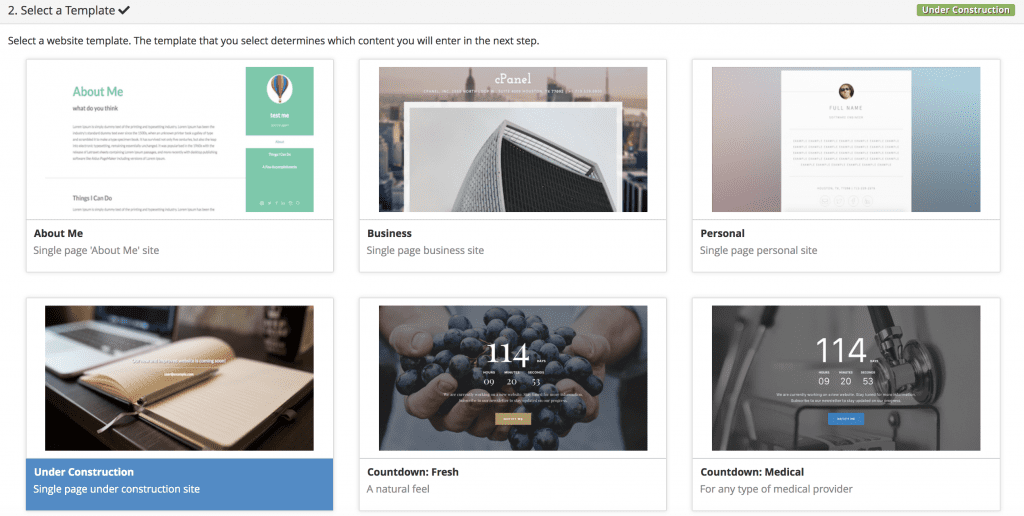
- Once selected, it will show you several templates that you can choose. Here, we’ll use Under Construction.
- All that’s left is filling out some details. When finished, hit the Publish button.
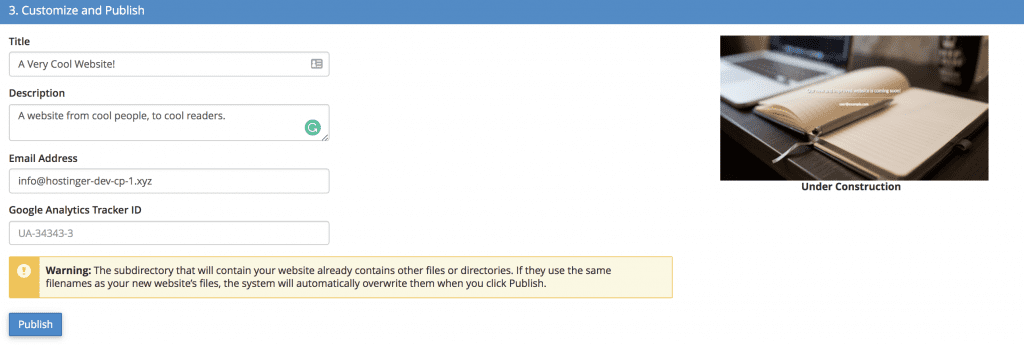


Important: If you’re website somehow doesn’t show up, you need to delete the index.php file in the public_html folder that we created in the earlier tutorial.
Now, you’ve successfully created a new temporary website to inform your visitors about what you wish. Here’s how ours look.

While you’re developing the website, let’s first create an official email account. So your eager audience can still get in touch.